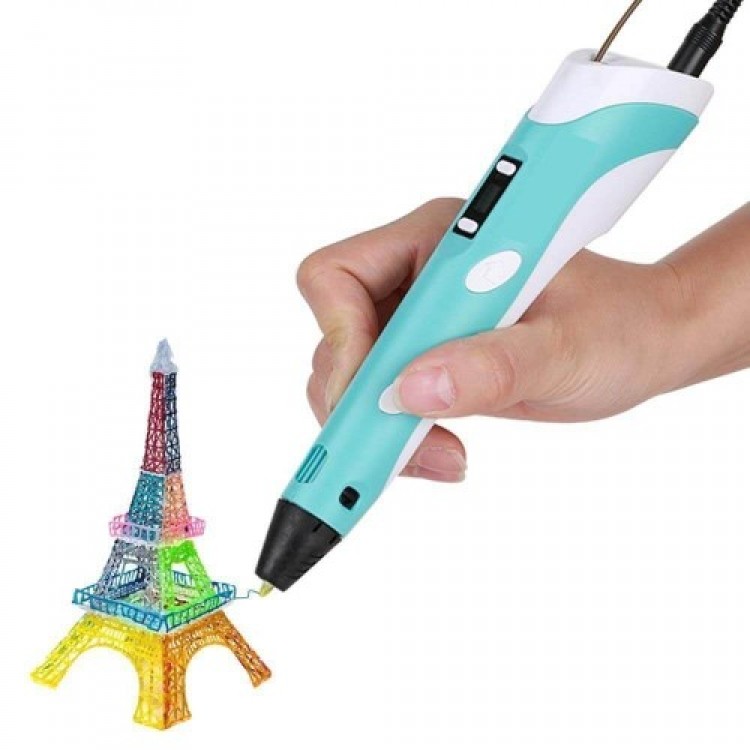
3D Pen PrinterThe 3D Pen Printer is a great tool for 3D modeling. After heating the filament inside the pen, simply move the pen along the model geometry to create your model. Once the filament cools quickly, your solid prototype will emerge. This means you can create models of anything you can imagine, just like with 3D printers.The 3D pen plastics – filaments – used in 3D printer pens are classified as "safe materials" and pose no health risks. They are safe for children to use.Features:Product: 3D Printer PenPrinting Technique: FDM - Fused Deposition ModelingCompatible Materials: 1.75mm ABS, PLA, HIPSNozzle Diameter: 0.6 mmPower: AC 100/250V 3A adapter / DC 5V 2A 24WWeight: 0.065 KGCertification: CE ROHS FCCPackage Contents:1 Piece – 3D Drawing Pen1 Piece – EU Output Adapter1 Piece – Filament Samples1 Piece – 3D Drawing Pen Stand Be sure to check your 3D printer pen immediately, set it up correctly, and do not attempt to repair it if there is a problem; do not make any changes or modifications. To start the device for the first time, press and hold the direction button for 5-10 seconds. If children will be using it, make sure they are using it correctly.The possibilities with a 3D printer pen are endless. It is very important to read the 3D pen user manual carefully and in detail and to follow the instructions to the letter. After thoroughly understanding topics such as safety, turning on and off, heat settings, loading and removing filament, grip angle, speed settings, and many more, you can enter this limitless world and use your device for a long time. Incorrect settings can lead to poor performance and results, preventing your pen from working properly. Keep your device dry and protect it from pressure, magnetic fields, extremely cold or hot environments, dust and foreign matter, physical impact, and drops.After each use, make sure to remove the filament from inside the pen. You can clean the plastic remaining on the tip of the pen with a brush or finger protector while the pen is still warm. Before inserting the filament into the pen, make sure both ends are straight. Do not push or pull when inserting or removing the filament from the pen. Adjusting pen speed and hand speed: If you move your hand too slowly, the filament (plastic material) will begin to accumulate and may cause clumping in the lines.Using a template: Using a template will make drawing easier, especially for designs such as circles, cylinders, and bodies. Drawing in the air: Make sure the base is firmly secured and fixed to the work surface. Adjust the speed of your hand and the pen. When drawing in the air, make sure the plastic has completely cooled before removing the pen from the plastic. You can use a fan to ensure rapid cooling.Pen color options: Pink, Lilac, Blue, Yellow